The Problem RAG Solves
Every mature business accumulates documents faster than anyone can read them. Contracts, compliance policies, HR manuals, product specs, audit reports, vendor agreements, past project proposals — the average 50-person company manages thousands of these. They sit in Google Drive folders organised by someone who left three years ago, or in an intranet nobody opens, or as email attachments whose subjects nobody can remember.
The real cost isn't storage. It's the time spent hunting for information that already exists. A lawyer re-reading a 90-page contract to check one clause. A sales rep unable to find the pricing exception they know was agreed somewhere. A support agent escalating a ticket because they can't locate the relevant policy section.
Retrieval-Augmented Generation (RAG) is the architectural pattern that solves this. It lets your team ask questions in plain English and get precise answers drawn directly from your document corpus — with citations showing exactly which document and which section the answer came from.
This guide covers how to actually build one, from ingestion to deployment, without skipping the parts that most tutorials leave out.
What RAG Is (and Isn't)
RAG is not fine-tuning. Fine-tuning trains a model on your data — expensive, time-consuming, and brittle when documents change. RAG keeps the model frozen and instead retrieves relevant context at query time, then passes that context to the LLM along with the question. The model answers based on what it retrieved, not on what it was trained on.
This distinction matters practically because:
- Documents can be added, updated, or removed without retraining anything
- The model cites sources — you can verify where every answer came from
- The total cost is a fraction of fine-tuning at any serious document volume
- Hallucinations are significantly reduced because the model is anchored to retrieved text
RAG is also not a chatbot wrapper around ChatGPT. That pattern — "just send all your documents to GPT" — breaks immediately when your corpus exceeds a few thousand tokens. Context windows are not free, latency scales with context length, and you lose precision as the context grows.
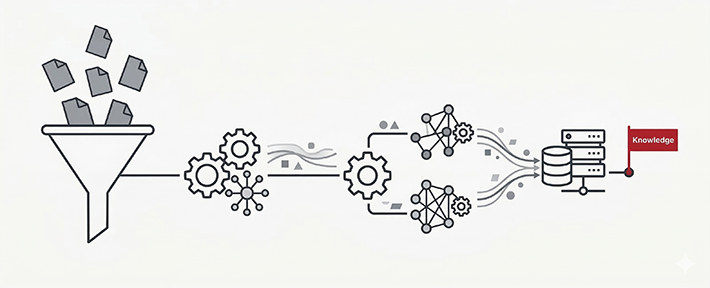
Query → embed query → vector search → retrieve top-K chunks → assemble prompt with chunks + query → LLM generates answer → return answer with source citations.
The Architecture: Five Components
1. Document ingestion pipeline
The ingestion pipeline is where most RAG systems break in production. It needs to handle your actual document formats — not just clean PDFs, but scanned invoices, password-protected contracts, Excel sheets with merged cells, Word documents with tracked changes, and HTML exports from legacy systems.
The practical stack we use: Apache Tika for format extraction (handles 200+ formats including scanned PDFs via OCR), Unstructured.io for document structure parsing (understands tables, headers, footnotes, and section hierarchy), and a custom preprocessing layer for domain-specific cleaning (removing boilerplate headers, page numbers, standard legal disclaimers that add noise without value).
Don't skip the preprocessing step. A contract where every page starts with "THIS AGREEMENT is made and entered into as of the date last signed below between the parties…" creates enormous noise in retrieval if you don't strip that boilerplate. Your retrieval precision will improve dramatically from clean input.
2. Chunking strategy
Chunking is the most consequential architectural decision in a RAG system and the one most teams get wrong. The goal is to split documents into units that are semantically coherent — large enough to contain meaningful context, small enough that retrieval stays precise.
Naive chunking (split every 512 tokens) fails because it splits mid-sentence, mid-table, and mid-clause. We use a hierarchy of strategies depending on document type:
- Legal and policy documents: Chunk by section heading. A contract clause is the natural unit of retrieval — splitting one clause across two chunks destroys the semantics.
- Technical manuals: Chunk by heading + one level below. A chapter is too large; a single step is too small. A procedure (3–10 steps) is right.
- Reports and analyses: Paragraph-level chunking with a 20% overlap between adjacent chunks. Overlap prevents losing context at chunk boundaries.
- Tables and structured data: Keep the full table as one chunk, with a natural language summary prepended. LLMs reason better about tables when they have a textual description alongside the raw data.
Target chunk size: 200–500 tokens with overlap. Store the chunk alongside its metadata: source document, section title, page number, document date, and document type.
3. Embedding and vector storage
Each chunk gets converted into a dense vector (embedding) that represents its semantic meaning. Similar chunks have similar vectors — this is what makes semantic search possible. A query about "termination clause notice period" will retrieve the relevant section even if the document uses the phrase "termination notice requirements".
For embedding models, we use OpenAI text-embedding-3-small as the default (fast, cheap, excellent for English business text). For multilingual corpora or Hindi/regional language documents, multilingual-e5-large or paraphrase-multilingual-mpnet performs better than OpenAI's models.
For vector databases, the choice depends on scale:
- Under 100K chunks:
pgvector(PostgreSQL extension) — no extra infrastructure, SQL-native, good enough performance. - 100K–5M chunks: Qdrant or Weaviate — purpose-built, supports filtering on metadata alongside vector similarity.
- Above 5M chunks: Pinecone or self-hosted Qdrant cluster.
For most document-heavy businesses (law firms, HR teams, procurement departments), pgvector on the existing PostgreSQL instance handles the load comfortably and eliminates an entire infrastructure dependency.
4. Retrieval and reranking
Basic vector similarity search returns the top-K most semantically similar chunks to a query. This works, but it misses two important improvements that matter in production:
Hybrid search combines dense vector similarity with sparse keyword search (BM25). This catches cases where exact terminology matters — a query for "Clause 14.2" or a specific contract number should retrieve that exact document, not whatever is semantically closest. Qdrant and Weaviate support hybrid search natively; pgvector requires a separate full-text search column alongside the vector column.
Reranking takes the top-20 retrieved chunks and runs a more expensive cross-encoder model to re-score them for relevance. The top-3 to top-5 after reranking are then passed to the LLM. This two-stage approach (cheap retrieval + expensive reranking on a small set) significantly improves answer quality for complex queries and costs a fraction of passing all 20 chunks to the LLM.
We use Cohere Rerank or the open-source cross-encoder/ms-marco-MiniLM-L-6-v2 for reranking. The quality improvement on legal and technical document queries is substantial — roughly 25–40% improvement in answer accuracy in our evaluations.
5. Generation with citations
The final step passes the retrieved, reranked chunks to the LLM along with the user's question and a carefully engineered system prompt. The system prompt must instruct the model to:
- Answer only from the provided context — never from general training knowledge
- Cite the source document and section for every factual claim
- Say "I couldn't find this in the documents" when the context doesn't contain an answer — rather than hallucinating one
- Preserve exact numbers, dates, and proper nouns from the source text
Citations are non-negotiable for business use. When a support agent tells a customer that their SLA is 4 hours, that agent needs to be able to point to Clause 8.3 of the service agreement. A RAG system without citations is a liability in any regulated or high-stakes context.
What Makes RAG Fail in Production
Most RAG demos work beautifully. Most RAG production deployments have rough edges within a week. The gaps between demo and production:
- Document freshness. When a contract is updated or a policy is amended, stale embeddings remain in the vector store. Build an update pipeline that detects document changes (hash-based or webhook-based), deletes old chunks by source document ID, and re-ingests the updated document. This is operationally unglamorous but critical.
- Scanned document quality. An OCR'd invoice with 85% accuracy produces chunks full of "c0ntract" and "arnount" — destroying retrieval. Run a confidence threshold on OCR output; flag low-confidence documents for human review rather than silently ingesting garbage.
- Query reformulation. Users ask short, ambiguous questions. "What's the notice period?" retrieves nothing useful if your documents say "termination notice requirements." Add a query expansion step — use a fast LLM call to rewrite the query into 3 variations before retrieval, then retrieve against all three.
- Access control. In any business deployment, not every user should see every document. Build document-level access control into the vector store metadata — filter retrieval by the user's permitted document set before ranking. Don't let RAG become an accidental data exposure vector.
- Evaluation. How do you know the answers are good? Build a small golden dataset of 50–100 question/answer pairs from your actual documents and run automated evaluation (using an LLM as a judge) after every pipeline change. Without evaluation, regressions are invisible.
Real Use Cases We've Built
To make this concrete, three RAG deployments we've shipped and what made each one interesting:
Legal contract query tool (law firm, Delhi). 12,000 contracts across 20 years. The challenge was entity extraction — before ingestion, we extracted parties, dates, and key clauses into structured metadata so users could filter ("show me all vendor contracts with XYZ Corp expiring this quarter") before semantic search. The metadata filter reduced the retrieval corpus for each query from 12,000 documents to under 200, making both speed and precision dramatically better.
HR policy assistant (manufacturing company, Noida). 400 employees, one HR manager, hundreds of policy questions per month. The RAG system handles routine queries (leave policy, reimbursement rules, attendance procedures) with citation links back to the exact policy section. The HR manager reviews edge cases flagged by the system. Policy update time went from "whenever someone remembers" to a 15-minute re-ingestion workflow.
Product manual search (B2B hardware company). 800 product manuals in English and Hindi. The challenge was mixed-language content — product names in English within Hindi-language manuals. Multilingual embeddings plus careful language detection in the ingestion pipeline solved this. A support agent can now ask in Hindi and retrieve from both language corpora.
Where to Start
If you have a document corpus that people are wasting time manually searching, RAG is almost certainly worth building. The practical entry point:
- Pick one document type that generates the most search friction (usually contracts or policies)
- Build a minimal pipeline: PyPDF2 extraction → 500-token chunks → text-embedding-3-small → pgvector → GPT-4o mini with citation prompt
- Test with 10 real questions your team asks regularly. Measure hit rate.
- Iterate on chunking and retrieval before adding complexity
- Once precision is good on the pilot corpus, expand to the full document set
Don't design for the full production architecture on day one. The most important insight comes from seeing where the simple pipeline fails — and that informs every architectural decision that follows.
We're happy to scope this for your specific document type and volume. Talk to us — the assessment is free and takes 45 minutes.